How to Design a Professional Book Cover on a Budget is essential knowledge for authors seeking to make a strong first impression and boost sales. A well-designed book cover serves not only as a visual representation of the content but also influences potential readers’ perceptions and purchasing decisions. Understanding the critical elements of design and the impact they have on your audience can elevate your book’s appeal significantly.
This guide will walk you through the vital steps of creating an eye-catching cover while being mindful of your budget. From understanding your target audience to utilizing online resources and gathering feedback, we will provide practical insights and strategies that empower you to achieve a professional look without breaking the bank.
Understanding the Importance of a Professional Book Cover
A professional book cover is not merely a decorative element; it serves as the first point of contact between the reader and the book. It plays a crucial role in influencing the reader’s perception and ultimately their purchasing decision. A well-designed cover conveys the book’s genre, tone, and theme, making it an essential marketing tool for authors and publishers alike.The impact of a book cover on sales cannot be overstated.
Research indicates that visually appealing covers significantly enhance the likelihood of a book being picked up by potential readers. A professional look is characterized by several key elements, including typography, color schemes, imagery, and layout. These components work in harmony to create a cohesive and attractive design that resonates with the target audience.
Elements Contributing to a Professional Look
Understanding the individual elements that contribute to a professional book cover can help authors make informed design choices, even on a budget. Key components include:
- Typography: The choice of fonts should align with the genre of the book. For instance, a thriller might utilize bold, sharp fonts, while a romance novel may feature softer, script-like lettering.
- Color Scheme: Colors evoke emotions and can influence reader perception. Selecting a color palette that reflects the book’s theme is essential. For example, dark colors may convey suspense, while pastel tones can suggest lightness and positivity.
- Imagery: High-quality images or illustrations should be relevant to the book’s content. A well-chosen image can intrigue potential readers and communicate a sense of the story’s atmosphere.
- Layout: The arrangement of text and images must be balanced and easy to read. A cluttered cover can overwhelm the viewer and detract from the overall message.
Each of these elements must work together to ensure that the book cover not only looks professional but also attracts the right audience.
Common Elements of Successful Book Covers in Your Genre
Different genres have distinct conventions that successful book covers typically follow. Recognizing these common elements can aid authors in creating covers that stand out while remaining genre-appropriate. Important aspects to consider include:
- Genre-Specific Imagery: For example, fantasy covers often feature mythical creatures or epic landscapes, while self-help books may utilize symbolic imagery that represents growth or change.
- Font Styles and Sizes: Certain genres have preferred font styles, such as modern sans-serif for contemporary fiction or ornate serif fonts for historical novels.
- Cover Trends: Staying aware of current trends within a specific genre can provide insights into effective design strategies. For instance, minimalistic designs have become popular across various genres, focusing on simplicity and impactful typography.
By adhering to these conventions, authors can create covers that not only appeal to their target demographic but also enhance their book’s chances of success in a competitive market.
“A compelling book cover can make the difference between a reader picking up your book or passing it by.”
Analyzing Your Target Audience
Understanding your target audience plays a crucial role in designing a professional book cover. A well-designed cover must resonate with potential readers and reflect their preferences, ultimately influencing their purchasing decisions. By analyzing your audience, you can create a compelling and appealing design that stands out in a competitive market.Researching your target audience’s preferences involves several methods that can yield valuable insights.
Begin by identifying the demographic characteristics of your readers, such as age, gender, location, and interests. Utilize online tools like surveys and questionnaires to gather direct feedback. Additionally, exploring reader reviews on platforms like Goodreads or Amazon can provide perspectives on what appeals to them in book covers. Analyzing social media trends and online forums related to your book’s genre can further enhance your understanding of audience preferences.
Methods for Researching Target Audience Preferences
To acquire detailed insights into your audience’s preferences, consider employing the following methods:
- Surveys: Create surveys to gain direct feedback from potential readers about their design preferences, color choices, and imagery that resonates with them.
- Focus Groups: Conduct focus group sessions with a small group of your target audience to discuss and analyze potential cover designs and receive immediate feedback.
- Social Media Analytics: Utilize analytics tools on platforms like Instagram, Twitter, or Facebook to observe engagement with different design styles and themes.
- Competitor Analysis: Examine the covers of best-selling books in your genre to identify common design elements that attract your target audience.
Incorporating audience feedback into your design is vital for ensuring the final product aligns with their expectations. After gathering insights, use this information to inform your design choices, such as colors, typography, and imagery. Collaborating with graphic designers who understand your audience can also enhance the design process. Consider revising your designs based on focus group discussions or survey results.
Importance of Genre-Specific Designs
Different genres have distinct visual conventions that appeal to their respective audiences. It is essential to recognize the significance of genre-specific designs to effectively communicate the essence of your book. A cover that aligns with genre expectations can signal to readers that your book is worth their time and investment.For instance, a romance novel often features warm colors and intimate imagery, while a thriller may utilize darker tones and bold typography to evoke suspense.
By aligning your book cover with genre-specific aesthetics, you can create a more immediate connection with your audience, encouraging them to explore the content further.
“A well-aligned cover design not only attracts attention but also reinforces the genre and theme of the book, creating instant recognition among readers.”
When designing your cover, ensure that it not only stands out but also encapsulates the essence of the story you are telling. This approach fosters a deeper understanding and connection with your target audience, ultimately enhancing their reading experience.
Setting a Budget for Design
Determining the budget for a professional book cover is a crucial step in the design process. It allows you to balance quality and affordability while ensuring that your book stands out in a competitive market. A well-allocated budget not only supports the design process but also maximizes your investment in marketing your book.Establishing your budget begins with understanding the costs associated with various elements of cover design.
By delineating these costs, you can allocate funds effectively, ensuring that each aspect of the design is well-supported. Below is a breakdown of potential costs involved in cover design, which can help illuminate how funds may be distributed.
Breakdown of Potential Costs
Different components contribute to the overall cost of book cover design. Each element carries its own price range, which should be considered when setting a budget. The following points Artikel these components:
- Design Services: Hiring a professional designer can range from $300 to over $2,500, depending on their experience and portfolio. Freelance designers often offer more budget-friendly options compared to established agencies.
- Stock Images: If using stock images, costs can range from $10 to $500 per image based on quality and licensing. Custom photography can significantly increase costs, often starting at several hundred dollars.
- Illustration: Custom illustrations can vary widely, typically falling between $200 to $2,000. The complexity and the artist’s reputation are key factors influencing pricing.
- Fonts and Licensing: Unique font licenses might cost anywhere from $50 to $500. Additionally, using free fonts can save costs but may not always provide the desired uniqueness in design.
- Print Costs: Factor in the cost of printing cover designs, which can range from $1 to $5 per copy, depending on materials and print quality. Bulk printing often yields cost savings.
- Marketing Materials: If you plan to create promotional materials (like bookmarks or posters), allocate an additional $100 to $500 for these supplementary designs.
Allocating your budget effectively is essential for achieving maximum impact. A strategic approach involves prioritizing the components that will have the most significant effect on your book’s appeal to its target audience.
“Investing in a professional design can significantly increase your book’s chances of success in the marketplace.”
When allocating resources, consider the following techniques:
- Identify the key design elements that resonate most with your target audience. Invest more in areas that directly impact appeal, such as cover art and typography.
- Utilize a tiered budget approach—start with essential costs (like design services) and allocate additional funds based on remaining resources for extras (like illustrations or promotional materials).
- Seek multiple quotes from designers to understand the market rate and ensure you get the best value for your investment.
- Be prepared to negotiate with designers for better rates or package deals, especially if you require additional services such as social media graphics.
By understanding these cost components and effectively allocating resources, authors can create a professional book cover that not only fits within their budget but also enhances the book’s marketability.
DIY Design vs. Hiring a Professional
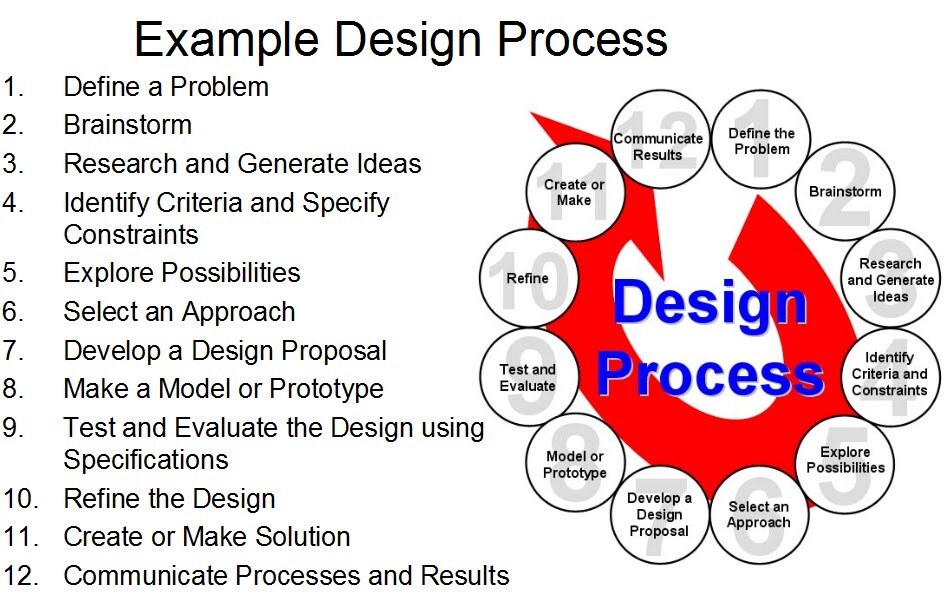
In the realm of book cover design, authors often face the dilemma of whether to create their covers independently or hire a professional designer. Each option presents its own unique advantages and challenges, and understanding these can greatly affect the final outcome of a book’s visual appeal and marketability.DIY design offers authors the opportunity to exercise their creativity and save costs.
However, it also comes with potential drawbacks that can impact the quality of the final product. When deciding whether to pursue a DIY approach or hire a professional, several key factors should be considered.
Benefits and Drawbacks of DIY Design
Engaging in DIY design can be both rewarding and complex. Here are some benefits and drawbacks associated with this approach:
- Cost Savings: Designing a book cover on your own eliminates the need for professional fees, making it a budget-friendly option.
- Creative Control: Authors retain full creative control, allowing for a design that reflects their vision and style.
- Learning Experience: The process can enhance design skills and provide insight into the publishing process.
- Time-Consuming: Creating a professional-quality cover may require considerable time and effort, which could detract from the writing process.
- Limited Expertise: Without design experience, authors may struggle to create an appealing and professional-looking cover that resonates with readers.
- Quality Concerns: A poorly designed cover can lead to negative perceptions of the book’s content and affect sales negatively.
When to Hire a Designer
In some scenarios, hiring a professional designer proves to be a more cost-effective decision in the long run. Here are situations where this choice may be justified:
- Limited Design Skills: If an author lacks the necessary design experience, hiring a professional can ensure a polished and effective cover.
- Time Constraints: Authors with tight deadlines may find it more efficient to delegate the design work to experts.
- Marketability Needs: Professionals understand market trends and can create designs that appeal broadly to target audiences.
- Brand Consistency: A designer can ensure that the cover aligns with any existing branding, creating a cohesive look across multiple works.
Tools and Software for DIY Book Cover Creation
For those opting for DIY design, there are numerous tools and software available that can facilitate the creation of eye-catching book covers. The following tools are popular among authors and designers alike:
- Canva: A user-friendly graphic design platform offering templates specifically for book covers, enabling authors to customize designs easily.
- Adobe Spark: This tool allows users to create stunning graphics and videos with ease, providing professional-quality designs.
- GIMP: A free and open-source image editor that offers advanced editing capabilities similar to Adobe Photoshop.
- BookCoverZone: An online platform where authors can find premade book covers or design custom options using their templates.
- Affinity Designer: A professional graphic design software that is more affordable than Adobe, suitable for detailed design work.
Utilizing these tools effectively can lead to impressive DIY designs if authors are willing to invest their time in learning the software and honing their design skills. The key is to balance creativity and professionalism to ensure the book cover meets industry standards while staying within budgetary constraints.
Utilizing Online Resources and Templates

In the digital age, aspiring authors and designers have access to an abundance of online resources that can aid in creating professional book covers without breaking the bank. Leveraging these resources effectively can transform a simple idea into an eye-catching design that resonates with readers. This section will delve into various reliable websites that offer affordable design templates, introduce free tools for aspiring designers, and provide insights on customizing these templates to maintain a professional look.
Reliable Websites for Affordable Design Templates
Many websites provide a wide array of templates specifically designed for book covers. These platforms not only offer affordability but also high-quality designs that can be tailored according to individual preferences. It is crucial to select reliable websites to ensure the resources utilized are reputable and effective. Below is a list of some of the most recommended websites:
- Canva: This user-friendly platform offers a plethora of customizable book cover templates. Users can easily modify colors, fonts, and images to align with their vision.
- Adobe Express: Previously known as Adobe Spark, this tool provides a selection of professional templates and intuitive design tools, making it suitable for those with varying levels of design experience.
- BookCoverZone: This site specializes in book cover designs and offers both free and paid templates that cater to different genres and themes.
- Visme: Visme combines presentation and graphic design tools, offering templates that can be customized to create visually appealing book covers.
Free Tools and Resources for Aspiring Designers
Utilizing free tools can significantly reduce design costs while still allowing for creativity and personalization. Below is a selection of valuable resources that aspiring designers can take advantage of:
- GIMP: A powerful open-source image editing software that provides capabilities similar to Adobe Photoshop, ideal for both beginners and advanced users.
- Pixlr: A web-based photo editing tool that allows for instant editing and design work, making it convenient for quick adjustments.
- Unsplash: A free stock photo website that offers high-resolution images, perfect for backgrounds or elements in book cover design.
- Font Squirrel: This site provides a wide selection of free fonts that are licensed for commercial use, enabling unique typography in cover designs.
Customizing Templates While Maintaining Professionalism
While utilizing templates can significantly streamline the design process, customizing them effectively is crucial for achieving a professional look. Customization should enhance a design rather than detract from its quality. Here are some essential tips for maintaining professionalism:
- Consistent Branding: Use colors, fonts, and images that align with your brand identity. This creates a cohesive look across all your works and promotional materials.
- High-Quality Images: Always opt for high-resolution images to ensure clarity and professionalism. Avoid pixelation or distortion by sourcing quality visuals.
- Limit Text: Less is often more in design. Use concise text that conveys the message without overwhelming the cover. Make sure the title and author name are prominent.
- Adjust Layout: While templates provide a starting point, adjust the layout to suit your unique vision. This might include repositioning elements or changing sizes to create balance.
Elements of a Compelling Book Cover Design
A professional book cover serves as the first point of contact between the reader and the book. It is crucial to create a striking impression that captures the essence of the book while appealing to potential readers. The elements of design play a significant role in achieving this goal. Understanding how typography, color, and imagery work together can elevate a book cover from ordinary to extraordinary.To create a cohesive design that accurately reflects the book’s content, it is essential to consider the following critical design elements, which contribute to a visually appealing and effective book cover.
Typography
Typography is a vital component of book cover design, as it communicates the genre and mood of the book. The choice of typeface, size, and arrangement can influence readability and emotional impact.
Typeface Selection
Different typefaces convey different emotions and atmospheres. For instance, a serif font may suggest tradition and reliability, while a sans-serif font could evoke modernity and simplicity.
Hierarchy and Size
Establishing a clear hierarchy through varying font sizes can guide the reader’s eye, emphasizing the title, subtitle, and author’s name appropriately.
Spacing and Alignment
Effective use of spacing ensures that text is legible and aesthetically pleasing. Proper alignment can create a sense of order and balance, enhancing the overall design.An effective example is the cover of “The Great Gatsby” by F. Scott Fitzgerald, which uses elegant serif typography that reflects the novel’s historical setting and themes of glamour.
Color
Color choices can evoke emotions and set the tone for the book. Colors can vary significantly based on the genre and target audience.
Color Psychology
Each color has its own psychological impact; for instance, blue often conveys trust and calmness, while red can evoke excitement or urgency. Understanding these associations can help in selecting the right palette.
Contrast and Harmony
Utilizing contrast can make text pop against the background, ensuring readability. Additionally, a harmonious color scheme can create a pleasing visual experience that draws readers in.
Brand Consistency
If the book is part of a series, maintaining a consistent color scheme can help establish a recognizable brand identity.An illustrative case is the cover of “The Hunger Games” series, where bold, fiery colors symbolize the intense themes of struggle and survival.
Imagery
Imagery is often the focal point of a book cover, serving as a visual representation of the story within. Relevant and compelling imagery can captivate potential readers.
Illustrations vs. Photographs
The choice between illustrations and photographs can significantly impact the cover’s appeal. Illustrations can provide a whimsical or abstract representation, while photographs may convey realism.
Symbolism
Imagery that symbolizes key themes or elements of the story can intrigue readers. For example, a cover featuring a broken clock may hint at themes of time and loss.
Negative Space
The effective use of negative space can create a striking visual balance, drawing attention to the main elements of the design without overwhelming the viewer.A prime example is the cover of “The Alchemist” by Paulo Coelho, which features a minimalist design enriched with symbolic imagery that resonates with the book’s themes of journey and discovery.
Layout and Space
The overall layout of the book cover is crucial for guiding the reader’s eye and creating a balanced composition.
Grid System
Utilizing a grid can help organize elements systematically, leading to a clean and professional look. This approach ensures that all components are aligned and proportionately sized.
Focus on Key Elements
Prioritize essential components such as the title and imagery, ensuring they are prominently displayed while maintaining balance with other text elements.
White Space
The intentional use of white space can create a sophisticated look, preventing the cover from appearing cluttered and allowing important elements to stand out.An excellent example of effective layout is the cover of “Thinking, Fast and Slow” by Daniel Kahneman, which employs a clear title and author placement alongside sufficient white space, achieving an elegant and professional appearance.
Gathering Feedback on Your Book Cover
Collecting feedback on your book cover is an essential step in the design process, allowing authors to understand how their work is perceived by others. Feedback can highlight strengths and weaknesses in the design, ensuring that the final product resonates with the intended audience. By effectively gathering input from peers and potential readers, authors can refine their designs and enhance the overall appeal of their book covers.One effective method for collecting feedback is through informal discussions with peers or members of writing groups.
Engaging with fellow authors can provide valuable insights based on their experiences and familiarity with the market. Furthermore, utilizing social media platforms or online writing communities allows for broader input from diverse audiences, which can be particularly useful in gauging reactions to specific design elements.
Methods for Collecting Feedback
Constructive feedback is crucial in improving your book cover design. Various methods exist to gather this input effectively:
- Peer Reviews: Share your book cover design with trusted colleagues or friends who can provide honest and constructive criticism. Aim for individuals who understand your genre and target audience.
- Target Reader Feedback: Conduct informal surveys with potential readers. This can be done at local libraries, bookstores, or through social media channels where your audience is likely to be present.
- Online Focus Groups: Utilize platforms that specialize in market research to create focus groups. Present multiple cover options and gather feedback on which resonates best and why.
Implementing constructive criticism is equally important. When feedback is received, it should be analyzed critically to determine which suggestions align with your vision and the market requirements. Keeping an open mind and being willing to adapt your design based on feedback can lead to significant improvements.
Using Surveys and Focus Groups
Surveys and focus groups are valuable tools for collecting structured feedback on your book cover options. By asking specific questions, you can gain insights into readers’ preferences and perceptions.
- Designing Surveys: Create an online survey that includes images of your book cover options. Ask participants to rate each design based on appeal, clarity, and genre appropriateness. Include open-ended questions for additional comments.
- Conducting Focus Groups: Organize small-group discussions where participants can view and discuss cover designs. This allows for dynamic interaction and deeper insights into group preferences.
- Feedback Implementation: After analyzing the data collected from surveys or focus groups, identify common themes in the feedback. Prioritize changes that align with your design goals and the preferences of your target audience.
“Feedback is the breakfast of champions.” – Ken Blanchard
Incorporating audience feedback can significantly enhance your book cover’s effectiveness in capturing attention and conveying the right message. By embracing a systematic approach to gathering and implementing feedback, authors can achieve a professional and appealing design within their budget constraints.
Finalizing Your Design for Print and Digital Formats

Finalizing your book cover design is a critical step in the publishing process, as it directly impacts both the presentation of your book and its marketability. Understanding the differences in design considerations for print and digital formats is essential to ensure your cover looks good on all platforms. By taking the time to prepare your design files properly, you can enhance the overall appeal and professionalism of your book, making it more inviting to potential readers.The design requirements for print and digital formats differ significantly.
Print covers must accommodate specific dimensions, bleed areas, and resolution requirements, while digital covers require adaptability to various screen sizes and formats. Print covers typically demand a resolution of at least 300 DPI (dots per inch) to maintain quality during the printing process, while e-book covers can work effectively at 72 DPI, as they are primarily viewed on screens. Additionally, colors may appear differently when printed versus viewed digitally; thus, it is crucial to consider color profiles.
For print, it is advisable to use CMYK color mode, while RGB is suitable for digital formats.
Preparing Design Files for Printing and Uploading
When finalizing your book cover design, it is essential to ensure your files are correctly prepared for their intended use. Below are the necessary steps to prepare your design files for both print and digital formats.
Set the Correct Dimensions and Resolution
For print covers, determine the final trim size and include bleed (usually 0.125 inches) to prevent any cutting off of important elements during printing.
Ensure that the cover design is set to a resolution of 300 DPI for high-quality prints.
- For e-books, design your cover to the most common dimensions, typically 1600 x 2560 pixels, and keep the resolution at 72 DPI.
- Choose the Right Color Profile
Use CMYK color mode for print designs to match how colors will appear when printed.
- Use RGB color mode for digital covers, as screens use this color model.
- Export Files in Suitable Formats
Save print files as PDF or TIFF to ensure high quality.
- Save digital cover files in JPEG or PNG format for easy uploading.
- Check for Text and Image Placement
Make sure that all text is legible and positioned away from cut lines to avoid being trimmed.
- Ensure that images are of high quality and not pixelated when printed.
- Review Metadata for Digital Files
Include relevant metadata such as title, author, and genre in your digital files to enhance discoverability on online platforms.
A checklist for final adjustments before publishing will help ensure that nothing is overlooked during the finalization process.
Final Adjustments Checklist
This checklist provides a systematic way to confirm all necessary adjustments have been made before publishing your book cover.
- [ ] Confirm the trim size and bleed specifications are correct.
- [ ] Validate that the resolution is set to 300 DPI for print and 72 DPI for digital.
- [ ] Ensure all colors are in the appropriate color mode (CMYK for print, RGB for digital).
- [ ] Review the text for typos, grammatical errors, and correct placement.
- [ ] Check that images are high-resolution and appropriately positioned.
- [ ] Export the final files in the correct formats (PDF/TIFF for print, JPEG/PNG for digital).
- [ ] Validate the inclusion of metadata for digital covers.
- [ ] Gather feedback from peers or professionals on the final design before submission.
- [ ] Create a backup of all final design files in multiple locations.
Following these guidelines will significantly enhance the quality of your book cover, making it more appealing to your target audience in both print and digital formats.
Epilogue
In conclusion, designing a professional book cover on a budget is not only feasible but can also be a rewarding creative endeavor. By harnessing the right tools, understanding your audience, and applying thoughtful design principles, you can create a cover that resonates with readers and reflects the quality of your work. As you finalize your design, remember that feedback is invaluable; it can refine your vision and ensure your cover stands out in a crowded market.